 ## Viewing attachments
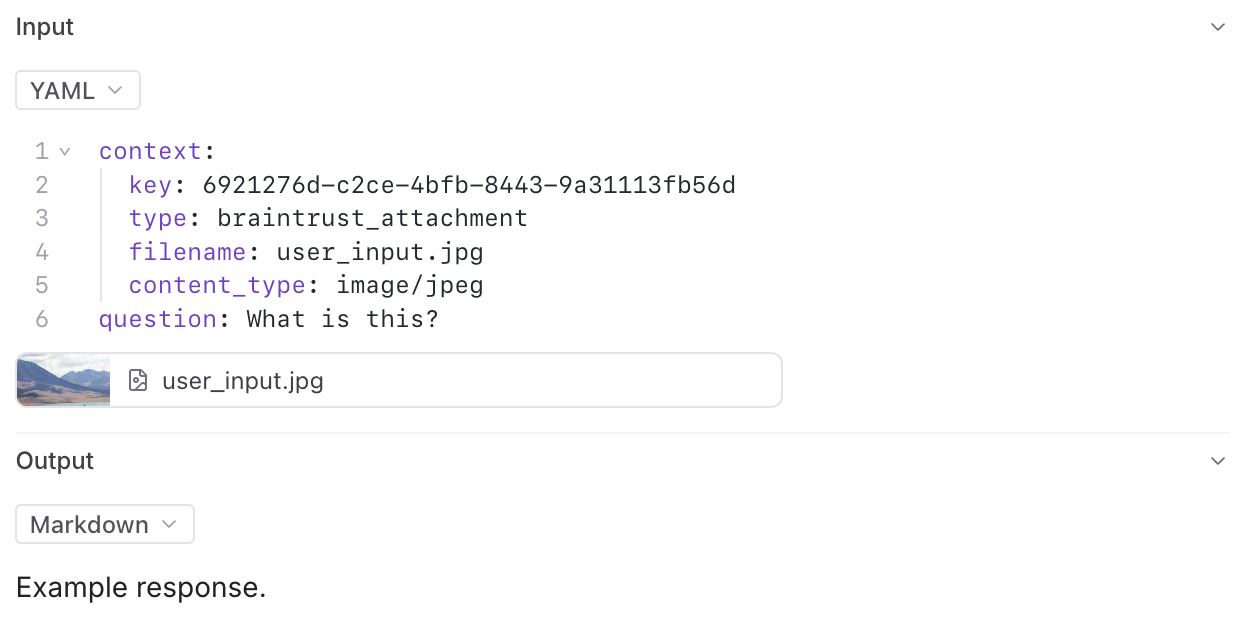
You can preview most images, audio files, videos, or PDFs in the Braintrust UI. You can also download any file to view it locally.
We provide built-in support to preview attachments directly in playground input cells and traces.
In the playground, you can preview attachments in an inline embedded view for easy visual verification during experimentation:
## Viewing attachments
You can preview most images, audio files, videos, or PDFs in the Braintrust UI. You can also download any file to view it locally.
We provide built-in support to preview attachments directly in playground input cells and traces.
In the playground, you can preview attachments in an inline embedded view for easy visual verification during experimentation:
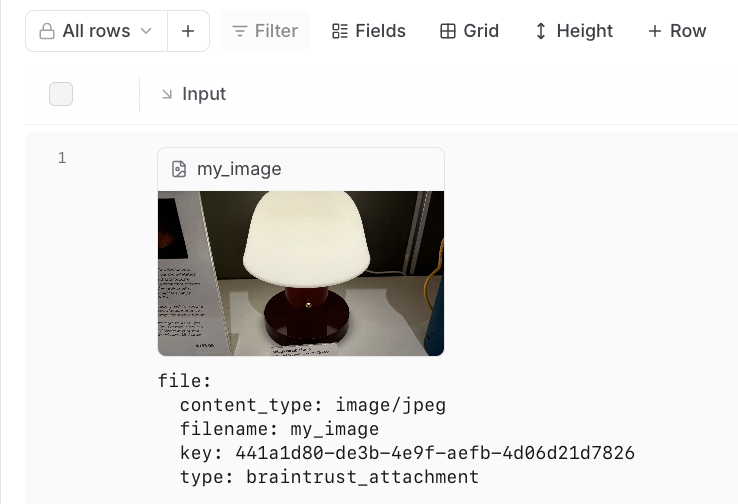 In the trace pane, attachments appear as an additional list under the data viewer:
 ---
file: ./content/docs/guides/automations.mdx
meta: {
"title": "Automations"
}
# Automations
Automations let you trigger actions based on specific events in Braintrust. This makes it easier for you to execute common actions and integrate Braintrust with your existing tools and workflows.
---
file: ./content/docs/guides/automations.mdx
meta: {
"title": "Automations"
}
# Automations
Automations let you trigger actions based on specific events in Braintrust. This makes it easier for you to execute common actions and integrate Braintrust with your existing tools and workflows.
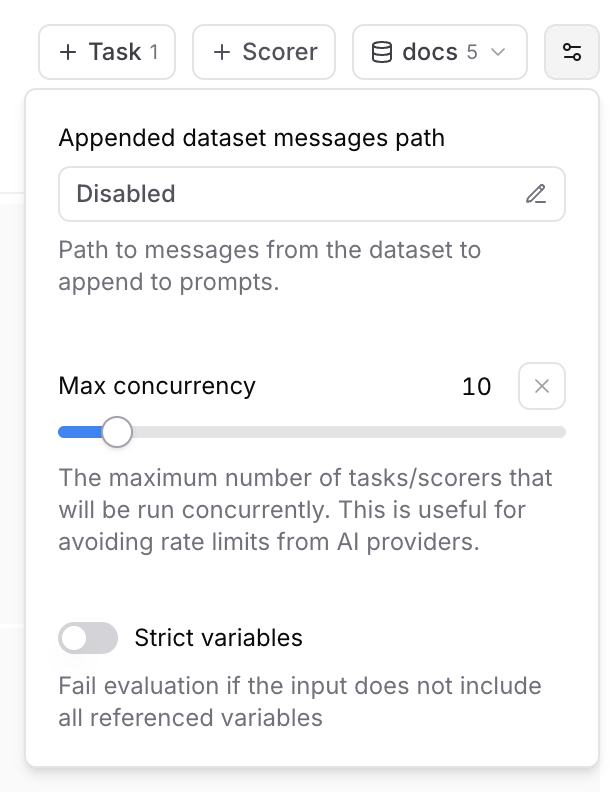 ### Max concurrency
The maximum number of tasks/scorers that will be run concurrently in the playground. This is useful for avoiding rate limits (429 - Too many requests) from AI providers.
### Strict variables
When this option is enabled, evaluations will fail if the dataset row does not include all of the variables referenced in prompts.
## Collaboration
Playgrounds are designed for collaboration and automatically synchronize in real-time.
To share a playground, copy the URL and send it to your collaborators. Your collaborators
must be members of your organization to view the playground. You can invite users from the settings page.
## Reasoning
### Max concurrency
The maximum number of tasks/scorers that will be run concurrently in the playground. This is useful for avoiding rate limits (429 - Too many requests) from AI providers.
### Strict variables
When this option is enabled, evaluations will fail if the dataset row does not include all of the variables referenced in prompts.
## Collaboration
Playgrounds are designed for collaboration and automatically synchronize in real-time.
To share a playground, copy the URL and send it to your collaborators. Your collaborators
must be members of your organization to view the playground. You can invite users from the settings page.
## Reasoning
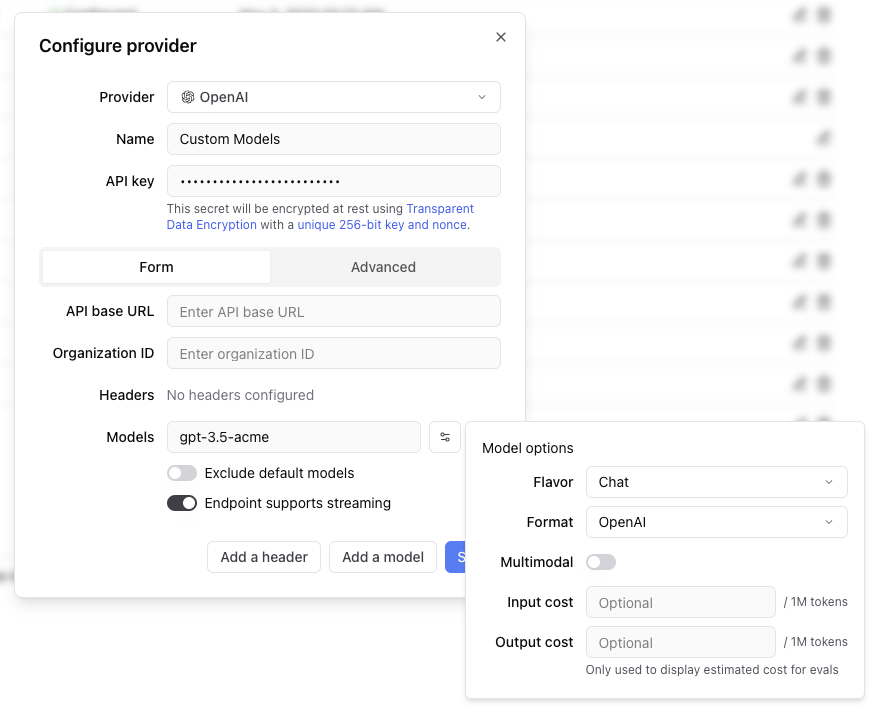 Any headers you add to the configuration will be passed through in the request to the custom endpoint.
The values of the headers can also be templated using Mustache syntax.
Currently, the supported template variables are `{{email}}` and `{{model}}`.
which will be replaced with the email of the user whom the Braintrust API key belongs to and the model name, respectively.
If the endpoint is non-streaming, set the `Endpoint supports streaming` flag to false. The proxy will
convert the response to streaming format, allowing the models to work in the playground.
Each custom model must have a flavor (`chat` or `completion`) and format (`openai`, `anthropic`, `google`, `window` or `js`). Additionally, they can
optionally have a boolean flag if the model is multimodal and an input cost and output cost, which will only be used to calculate and display estimated
prices for experiment runs.
#### Specifying an org
If you are part of multiple organizations, you can specify which organization to use by passing the `x-bt-org-name`
header in the SDK:
Any headers you add to the configuration will be passed through in the request to the custom endpoint.
The values of the headers can also be templated using Mustache syntax.
Currently, the supported template variables are `{{email}}` and `{{model}}`.
which will be replaced with the email of the user whom the Braintrust API key belongs to and the model name, respectively.
If the endpoint is non-streaming, set the `Endpoint supports streaming` flag to false. The proxy will
convert the response to streaming format, allowing the models to work in the playground.
Each custom model must have a flavor (`chat` or `completion`) and format (`openai`, `anthropic`, `google`, `window` or `js`). Additionally, they can
optionally have a boolean flag if the model is multimodal and an input cost and output cost, which will only be used to calculate and display estimated
prices for experiment runs.
#### Specifying an org
If you are part of multiple organizations, you can specify which organization to use by passing the `x-bt-org-name`
header in the SDK:
### Iterative experimentation
Rapidly prototype with different prompts
and models in the [playground](/docs/guides/playground)
and models in the [playground](/docs/guides/playground)
### Performance insights
Built-in tools to [evaluate](/docs/guides/evals) how models and prompts are performing in production, and dig into specific examples
### Real-time monitoring
[Log](/docs/guides/logging), monitor, and take action on real-world interactions with robust and flexible monitoring
### Data management
[Manage](/docs/guides/datasets) and [review](/docs/guides/human-review) data to store and version
your test sets centrally
your test sets centrally
Templated messages to send to an LLM. *
General purpose code that can be invoked by LLMs. *
Functions for scoring the quality of LLM outputs (a number from 0 to 1). ## Composability Functions can be composed together to produce sophisticated applications that would otherwise require brittle orchestration logic.  In this diagram, a prompt is being invoked with an input and is calling two different tools and scorers to ultimately produce a streaming output. Out of the box, you also get automatic tracing, including the tool calls and scores. Any function can be used as a tool, which can be called, and its output added to the chat history. For example, a RAG agent can be defined as just two components: * A vector search tool, `toolRAG`, implemented in TypeScript or Python, which embeds a query, searches for relevant documents, and returns them
#### US East 2 {`https://braintrust-cf-us-east-2.s3.amazonaws.com/braintrust-latest.yaml`}
#### US West 2 {`https://braintrust-cf-us-west-2.s3.amazonaws.com/braintrust-latest.yaml`}
To start in us-east-1, [click here to open up the CloudFormation setup window](https://console.aws.amazon.com/cloudformation/home#/stacks/create/review?templateURL=https://braintrust-cf-us-east-1.s3.amazonaws.com/braintrust-latest.yaml). If you prefer, you can also click “Create Stack” directly in the CloudFormation console and specify one of the URLs above as the S3 template link. 
You can also opt into sending telemetry to our Datadog instance, and we can monitor the uptime of your system for you. | When you run into issues (e.g. Internal server errors), you’ll have to find them in your logs, and either share the log messages with us (or try to diagnose them yourself). You will also need to configure your own monitoring/alerting. We can provide guidance on what to look for to know something is wrong.
We are currently working on a new revision to how we monitor all clusters (see below). | ## Monitoring
Image, audio, video, and PDF attachments can be previewed in Braintrust. All
attachments can be downloaded for viewing locally.
### Using external files as attachments
Braintrust also supports references to files in external object stores with
the `ExternalAttachment` object. You can use this anywhere you would use an
`Attachment`. See the [Attachments](/docs/guides/attachments) guide for more
information.
### Linking to external images
To log an external image, provide an image URL, an external object store URL, or a base64 encoded image as a
string. The tree viewer will automatically render the image.

The tree viewer will look at the URL or string to determine if it is an image. If you want to force the
viewer to treat it as an image, then nest it in an object like
```json
{
"image_url": {
"url": "https://example.com/image.jpg"
}
}
```
and the viewer will render it as an image. Base64 images must be rendered in URL format, just like the [OpenAI API](https://platform.openai.com/docs/guides/vision?lang=curl).
For example:
```json
data:image/png;base64,iVBORw0KGgoAAAANSUhEUgAAABgAAAAYCAYAAADgdz34AAAABHNCSVQICAgIfAhkiAAAAAlwSFlzAAAApgAAAKYB3X3/OAAAABl0RVh0U29mdHdhcmUAd3d3Lmlua3NjYXBlLm9yZ5vuPBoAAANCSURBVEiJtZZPbBtFFMZ/M7ubXdtdb1xSFyeilBapySVU8h8OoFaooFSqiihIVIpQBKci6KEg9Q6H9kovIHoCIVQJJCKE1ENFjnAgcaSGC6rEnxBwA04Tx43t2FnvDAfjkNibxgHxnWb2e/u992bee7tCa00YFsffekFY+nUzFtjW0LrvjRXrCDIAaPLlW0nHL0SsZtVoaF98mLrx3pdhOqLtYPHChahZcYYO7KvPFxvRl5XPp1sN3adWiD1ZAqD6XYK1b/dvE5IWryTt2udLFedwc1+9kLp+vbbpoDh+6TklxBeAi9TL0taeWpdmZzQDry0AcO+jQ12RyohqqoYoo8RDwJrU+qXkjWtfi8Xxt58BdQuwQs9qC/afLwCw8tnQbqYAPsgxE1S6F3EAIXux2oQFKm0ihMsOF71dHYx+f3NND68ghCu1YIoePPQN1pGRABkJ6Bus96CutRZMydTl+TvuiRW1m3n0eDl0vRPcEysqdXn+jsQPsrHMquGeXEaY4Yk4wxWcY5V/9scqOMOVUFthatyTy8QyqwZ+kDURKoMWxNKr2EeqVKcTNOajqKoBgOE28U4tdQl5p5bwCw7BWquaZSzAPlwjlithJtp3pTImSqQRrb2Z8PHGigD4RZuNX6JYj6wj7O4TFLbCO/Mn/m8R+h6rYSUb3ekokRY6f/YukArN979jcW+V/S8g0eT/N3VN3kTqWbQ428m9/8k0P/1aIhF36PccEl6EhOcAUCrXKZXXWS3XKd2vc/TRBG9O5ELC17MmWubD2nKhUKZa26Ba2+D3P+4/MNCFwg59oWVeYhkzgN/JDR8deKBoD7Y+ljEjGZ0sosXVTvbc6RHirr2reNy1OXd6pJsQ+gqjk8VWFYmHrwBzW/n+uMPFiRwHB2I7ih8ciHFxIkd/3Omk5tCDV1t+2nNu5sxxpDFNx+huNhVT3/zMDz8usXC3ddaHBj1GHj/As08fwTS7Kt1HBTmyN29vdwAw+/wbwLVOJ3uAD1wi/dUH7Qei66PfyuRj4Ik9is+hglfbkbfR3cnZm7chlUWLdwmprtCohX4HUtlOcQjLYCu+fzGJH2QRKvP3UNz8bWk1qMxjGTOMThZ3kvgLI5AzFfo379UAAAAASUVORK5CYII=
```
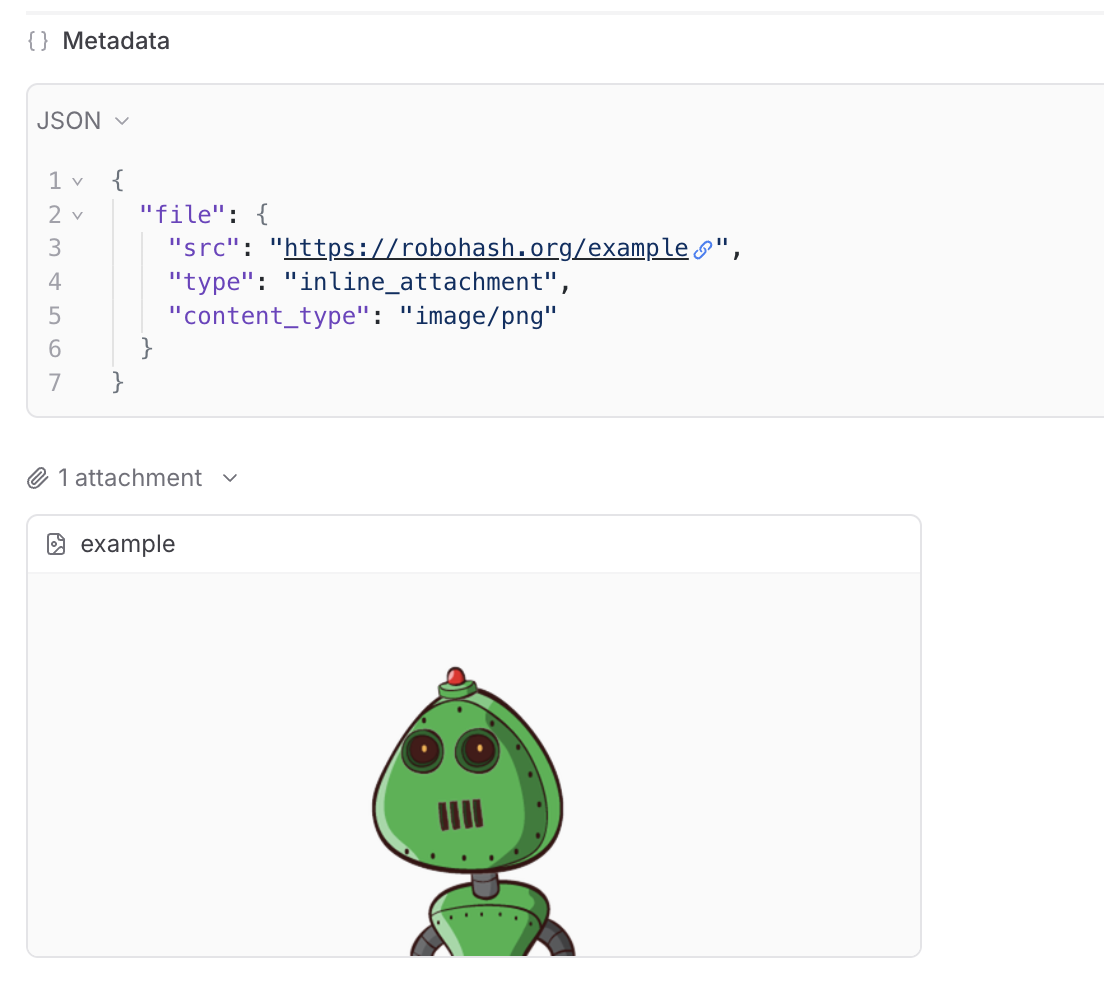
If your image's URL does not have a recognized file extension, it may not get rendered as an image automatically. In this case,
you can use an [inline attachment](/docs/guides/attachments#inline-attachments) to force it to be rendered as an image.
## Errors
When you run:
* Python code inside of the `@traced` decorator or within a `start_span()` context
* TypeScript code inside of `traced` (or a `wrappedTraced` function)
Braintrust will automatically log any exceptions that occur within the span.

Under the hood, every span has an `error` field which you can also log to directly.
No data
;
}
return (
Reset Password
```
Reset Password
```

John Doe
Lorem ipsum dolor sit amet, consectetur adipiscing elit. Nulla ut turpis
hendrerit, ullamcorper velit in, iaculis arcu.
500
Followers
250
Following
1000
Posts
```